The Session That Ate Itself

I spawned 19 agents to process a multi-step dialogue session. The orchestrator phase had 100+ file operations queued -- reads, writes, state updates, transcript appends. Three context compactions later, I had 0-byte output files, orphaned agents with no parent, and an entire session's work gone.

Nineteen agents. Zero usable output. And the worst part: no single agent crashed. They all completed. They all reported success.

This was a sizing problem. I'd handed each agent a scope that no context window could survive. After 2.5 years of running production AI agent systems -- newsletter pipelines, content generation, data processing -- I've landed on a hard rule: background agents fail above 10 file operations. Not sometimes. Reliably.

These numbers come from Claude Code production systems, but the principle is model-agnostic. Any agent with a finite context window and tool-use capabilities hits this wall.


The Three Ways Agents Die Above 10 Files

I've cataloged three distinct failure modes from real production incidents. They look different on the surface but share a root cause.

1. Context exhaustion and the compaction cascade

The agent accumulates so much read-write context that the model compacts mid-task. Post-compaction, it loses track of which files it already modified, which writes completed, which operations were still queued. The agent doesn't crash -- it continues with amnesia. Partial work, duplicate operations, inconsistent state.

In my Session 2 disaster, three compactions happened in sequence. After each one, the agent picked up approximately where it left off -- but "approximately" meant re-reading files it had already processed and skipping files it hadn't touched. The output was a patchwork of duplicates and gaps.

2. Partial writes and 0-byte files

The agent starts writing output, hits a context or rate boundary, and produces a 0-byte file or a truncated artifact. Downstream agents read an empty file and proceed as if everything's fine. No errors in the logs. Just empty data propagating through the pipeline.

I've had agents write 0 bytes to an output file and then mark the task "complete" in their state log. The state says done. The file says nothing.

3. Hallucinated completions

The most insidious mode. The agent reports success on operations it never performed. Most common when the task list is long and context is running low. Instead of executing the remaining operations, it generates a plausible summary of what it "did."

One agent wrote a confident iteration log entry: "All 15 files processed, output validated." The output directory was empty.

Why all three share a root cause

Every failure traces back to the same constraint: working memory is finite, and file operations consume it aggressively. Reads fill the context. Writes require holding the read context plus the generation target. Each additional file operation is multiplicative, not additive -- the agent has to maintain awareness of everything it's already done while planning what comes next.

Detection: check the files, not the log

  • Context exhaustion -- Monitor for compaction events. More than one compaction per agent invocation means the scope is too large.
  • Partial writes -- Validate file sizes post-run. Any 0-byte file is a failed write, regardless of what the status log says.
  • Hallucinated completions -- Never trust agent self-reports. Count output files independently and check non-zero sizes.

I've made verification its own agent now. A lightweight validation agent reads the manifest, checks file existence and size, reports discrepancies. About 37K tokens, under a minute. Cheap insurance.


The 10-File Rule

Background agents get fewer than 10 file operations per invocation. Reads and writes both count. No exceptions.

This isn't a guideline. It's a constraint -- the same way you'd set a memory limit on a container or a timeout on an API call.

The tier system

  • LOW (fewer than 10 files) -- Safe. A single agent handles it reliably.
  • MEDIUM (10-20 files) -- Maybe 60% success rates. Not good enough for production.
  • HIGH (20+ files) -- Must split before execution. I've never seen a 20+ file agent complete reliably.

Why 10, specifically

A typical file runs 150-300 lines, roughly 2K-4K tokens. At 10 files, you're loading 20K-40K tokens of source material. Add system prompt (~3K), conversation overhead (~15K-25K), and generation budget (~20K-40K). Total working memory: 60K-100K tokens.

That's the sweet spot -- enough room for the model to hold everything simultaneously without degradation.

Push to 20 files and source material alone doubles to 40K-80K tokens. The model starts dropping earlier context, and that's when writes go silent. You're hitting the point where attention degrades with input length. Research from Hong et al. (2025) measured 18 LLMs and found performance grows increasingly unreliable as context fills.

Don't get me wrong -- context windows are getting bigger. But more context isn't better context. A 200K window doesn't mean 200K of reliable working memory. It means maybe 80K-100K of high-fidelity working memory with graceful degradation above that.


Research Agents vs. Write Agents -- Different Sizing Rules

Reading 30 files to synthesize a research memo is fundamentally different from modifying 30 files in a codebase. Same total file count. Completely different failure profiles.

Why the asymmetry exists

Read operations fill context but don't require maintaining edit state. The agent reads, absorbs, generates a synthesis. Each new file adds information, and the job is compression.

Write operations require holding the source context AND the modification plan AND the output simultaneously. Each write multiplies cognitive load -- the agent tracks what it changed while planning what it still needs to change.

Research agent sizing

Research agents can handle 20-30 file reads if the output is a single synthesis document. In my content pipeline, research+outline agents average ~400K tokens and 35-45 tool calls. They read extensively and produce focused output. That read-heavy, write-light profile keeps them safe despite the high token count.

Write agent sizing

Write agents get a hard cap at 10 operations, reads and writes combined. Single work type per invocation -- don't mix file creation with editing with state updates.

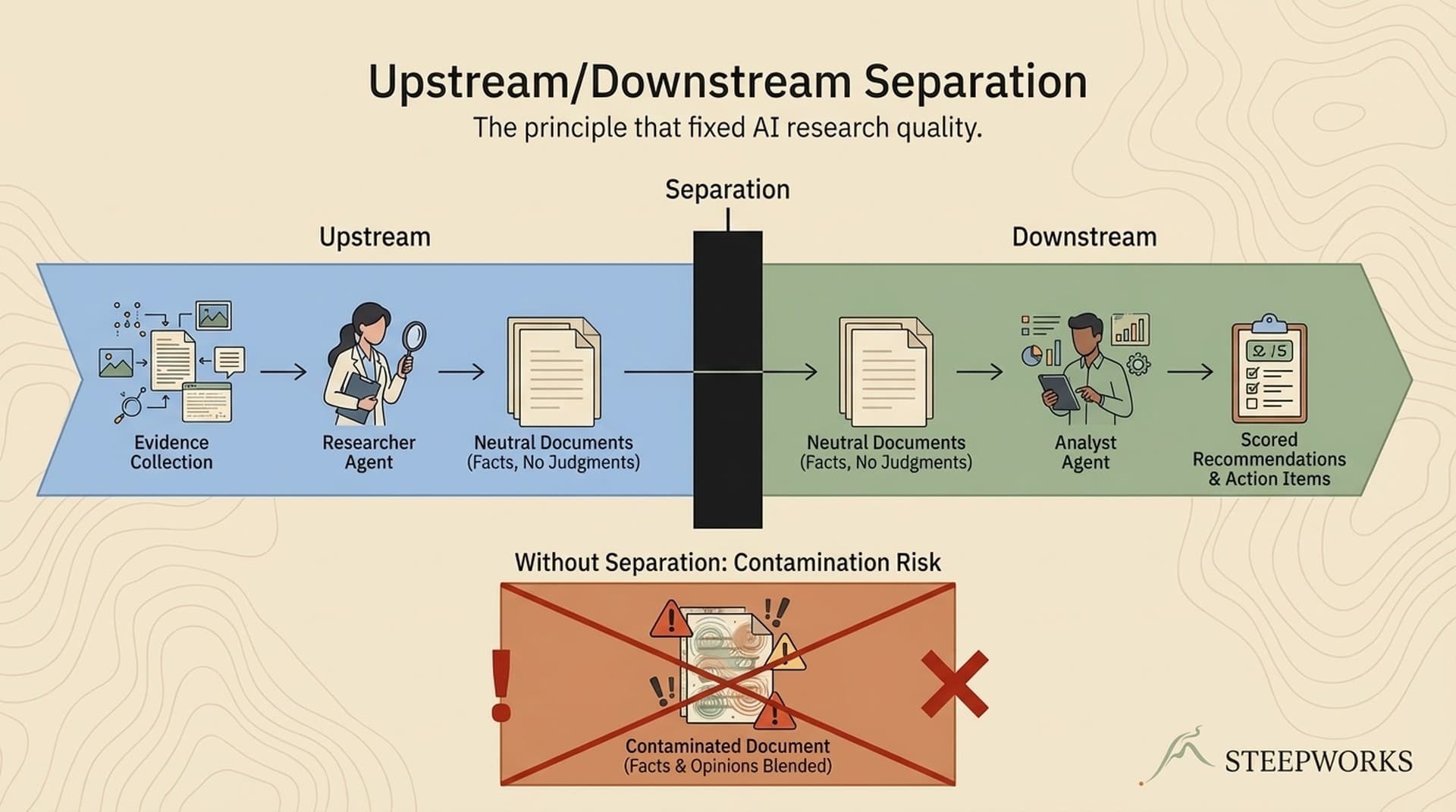
The critical rule: never let a write agent also do its own validation. That's a separate agent. Mixing those roles is how you get hallucinated completions.

I run a content pipeline with 10 parallel agents that each handle exactly 3 files -- read source material, write draft, write critique. Ten agents at 3 files each: 30/30 success. One agent at 30 files: failure at file 12. That's the sizing lesson in a single comparison.

For more on how this multi-agent pattern works, see How 7 AI Agents Evaluate 120 Articles Weekly.


How to Decompose a 50-File Task

Step 1: Inventory the file operations

Before spawning any agent, write a manifest. List every file it needs to read and every file it will produce. If the manifest exceeds 10, split before you start.

Step 2: Group by work type

Separate reads from writes. Separate creation from modification. Separate content generation from validation. Mixed-mode agents are the most failure-prone pattern I've seen.

Step 3: Define the dependency chain

Map which groups must run sequentially (Phase A output feeds Phase B) and which can run in parallel. In my content pipeline, 10 agents run in parallel because no agent depends on another's output.

Step 4: Assign context budgets

Tag every work unit as LOW, MEDIUM, or HIGH. If any lands at HIGH, split again.

Step 5: Build checkpoint boundaries

Every work unit writes its state to disk on completion. If an agent dies, the next picks up from the last checkpoint. Without checkpoints, a failure at step 47 of 50 means starting over. With them, it means re-running step 47.

A concrete example: 74 articles

I batched 10 at a time. Each batch spawned 10 parallel agents. Each agent handled 3 files. Thirty file operations per batch, but only 3 per agent. Batch 1: zero failures. Total token consumption: ~870K across the batch.

One mega-agent for all 74 would have consumed 2-3M+ tokens and almost certainly failed partway through, wasting everything spent up to that point.

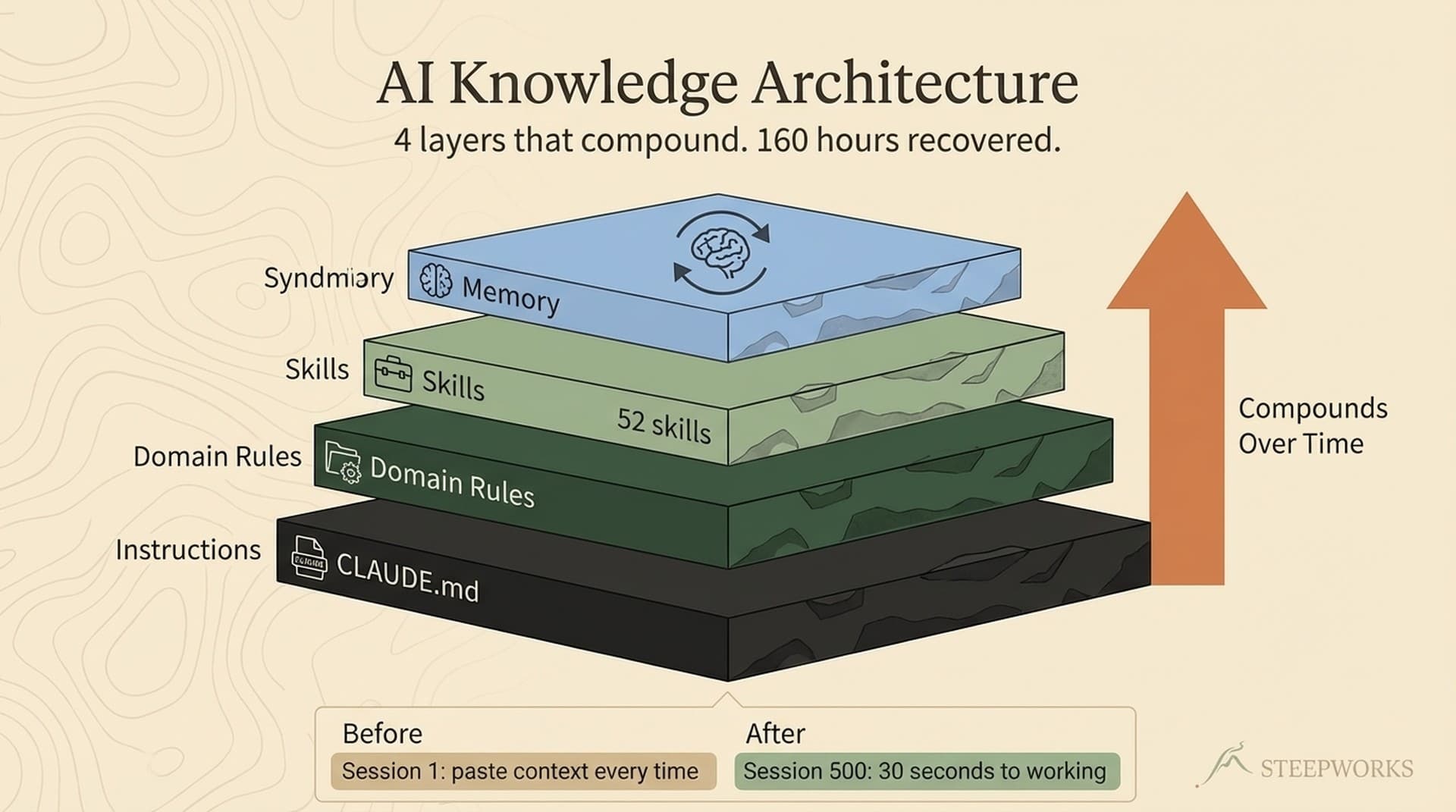
For the system architecture that supports this decomposition, see 4,700 Files and Zero Onboarding -- Inside My Knowledge OS Architecture.


What This Looks Like for GTM Work

The 10-file rule sounds like a developer concern. It's not. If you're using AI agents for any GTM workflow at volume, you're hitting this wall — you just might not know why things keep "almost working."

Processing deal transcripts. Say you want to analyze 50 Gong calls for MEDDPICC signals. One agent reading all 50 transcripts and producing a pipeline summary? It'll fade around call 12. The early calls get thorough analysis. By call 30, the agent is skimming. By call 45, it's hallucinating confident summaries of calls it barely parsed. Instead: 10 agents, 5 calls each. Each agent reads deeply, extracts structured signals, writes to a file. An 11th agent reads the 10 output files and synthesizes. Total cost is similar. Quality is night-and-day.

Content production at scale. This article is one of 20 I produced in a single session. Each article went through outline → draft → anti-slop polish → meta generation → publish. If I'd tried to run all 20 through one agent sequentially, the drafts would degrade by article 5. Instead: 10 parallel agents per wave, each handling one article through the full pipeline (3-4 file operations: read outline, read research, write draft). Twenty articles, zero failures. One mega-agent would have produced maybe 8 usable drafts before context exhaustion turned the rest into filler.

Lead enrichment batches. You want to enrich 100 accounts with firmographic data and generate personalized first-touch emails. One agent doing all 100? Context dies at account 15. The first 10 emails are sharp and personalized. The last 10 reference the wrong industry. Ten agents at 10 accounts each — every email gets the full context window's attention.

The pattern is always the same: small agents in parallel beat large agents in sequence. Not because the model is dumb. Because working memory is finite, and file operations consume it faster than you'd expect.


The Economics: Smaller Agents Are Cheaper

This is counterintuitive but consistent across hundreds of production runs.

From real invocations:

  • Research+outline agents: ~400K tokens, 35-45 tool calls, 6-8 minutes
  • Draft quality agents: ~80K tokens, 12-13 tool calls
  • Lightweight meta-generation: ~37K tokens, ~45 seconds

A 10-file agent might use 400K tokens. A 20-file agent doesn't use 800K — it often hits 1.2M+ because context management overhead compounds. The model spends more tokens planning, tracking, and recovering from its own confusion.

Ten parallel agents at ~400K tokens each cost roughly the same as one mega-agent at 2-3M+. But the mega-agent fails and retries, so its actual cost is higher. Smaller agents succeed on first pass — no retries, no wasted tokens, no manual cleanup.

The budget heuristic: count files, estimate average size in tokens, multiply by 2x for read-context overhead, add 30% for tool call overhead. If that exceeds 60-70% of the context window, the agent is over-scoped. Split it. Anthropic's context engineering guidance reinforces this: progressive disclosure and scoped context outperform dumping everything into one massive prompt.


How This Connects to Multi-Session Work

The 10-file rule governs what happens within a single agent invocation. But most real GTM projects span multiple sessions — a 7-phase pipeline readiness task, a 20-article content series, a quarterly ICP rebuild with enrichment.

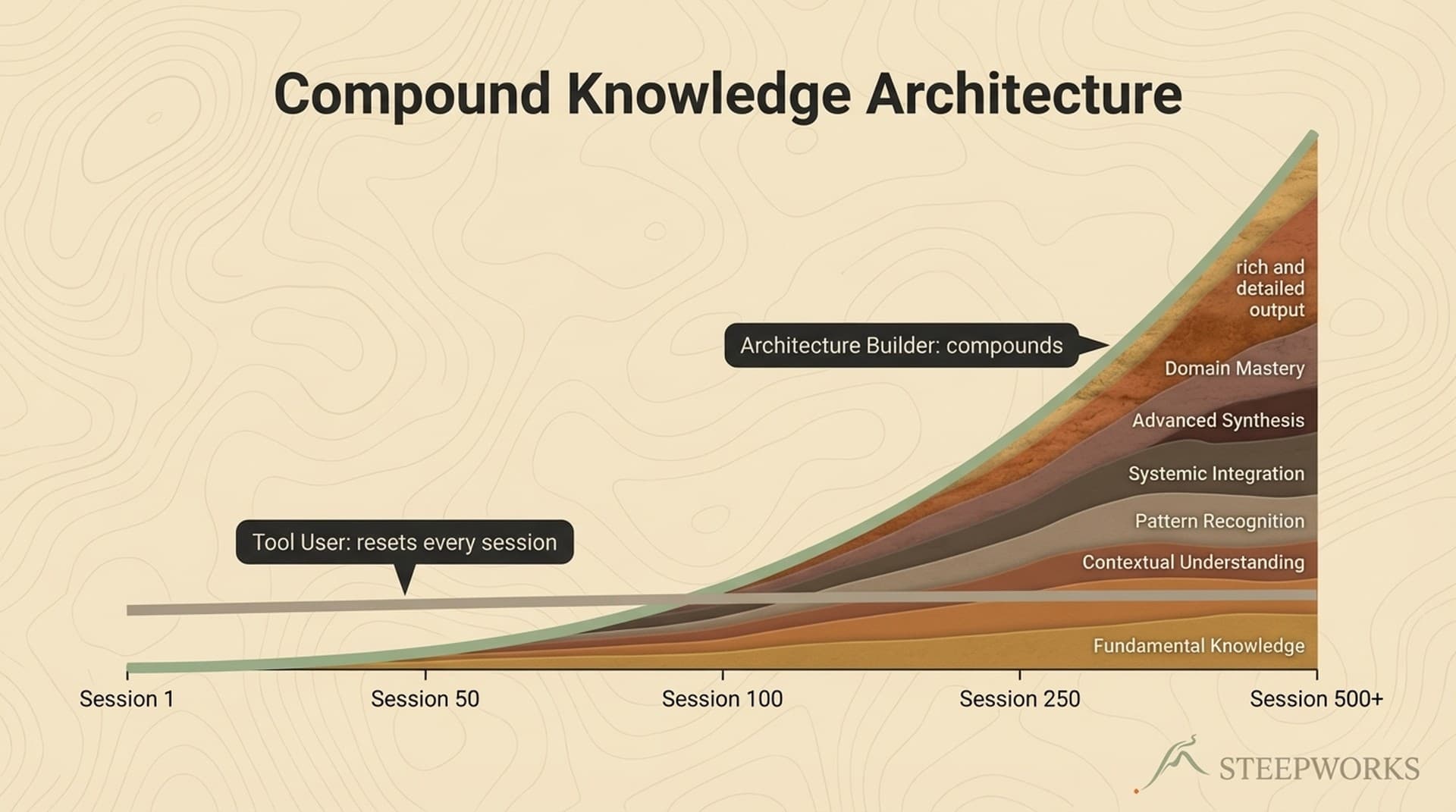
That's where sizing meets the stateless iteration pattern. Each iteration of a Ralph-style PRD executes one bounded action — sized to fit within the 10-file rule — then writes its state to disk and exits. The next iteration reads state, executes the next action, writes state. The sizing rule determines how big each iteration can be. The iteration pattern determines how many iterations you need.

A 50-file task isn't one agent doing 50 operations. It's 5-10 iterations, each handling a scoped batch, with checkpoints between them. The iteration pattern makes the task survivable across sessions. The sizing rule makes each iteration reliable within a session. They're two sides of the same constraint.


The 10-file rule isn't elegant. It's the constraint I discovered after losing enough work to take sizing seriously.

If you're running agents for GTM work and things fail in ways that seem random — partial outputs, confident reports of work that didn't happen, agents that complete but produce nothing — check the scope. Count the files. The answer is almost always that the agent was sized too large for what any context window can reliably hold. Split it. Run smaller agents in parallel. Validate outputs independently. The discipline isn't glamorous, but it's what separates "AI agents work in demos" from "AI agents work in my pipeline every day."


This workflow runs on Claude Code for GTM — the same stack that powers every STEEPWORKS skill and agent.